

In today’s business environment, workflow automation has evolved from an efficiency play to a core growth infrastructure. McKinsey’s latest global AI survey finds that 88% of organizations now use automation in at least one business function.
By streamlining repetitive tasks and improving operations, it enables companies to scale efficiently and dedicate efforts to innovation.
What Is Workflow Automation?
Workflow automation is the use of software, digital tools, and predefined rules to design, execute, and manage business processes automatically, minimizing manual effort.
It enables tasks, data, and decisions to move seamlessly between people and systems, assuring that repetitive and time-consuming activities are done with accuracy, consistency, and on time.
By automating workflows throughout multiple departments such as sales, marketing, finance, operations, and customer support, organizations can improve efficiency, minimize errors, increase clarity, and focus human effort on higher-value, strategic work.
Why Workflow Automation Is Essential for Business Growth?
Workflow automation is essential for business survival in a world where speed wins. Teams that are hindered by manual data entry, disjointed approvals, and never-ending follow-ups deal with daily problems that reduce profits, annoy staff, and give agile rivals an advantage. Workflow automation is a necessity rather than an experiment, as evidenced by the fact that 84% of businesses using it report significant process improvements, according to TechTarget research.
Workflow automation levels the playing field in 2026’s competitive market by facilitating quicker decision-making, fewer mistakes, and better customer experiences.
How Workflow Automation Works?
At its core, workflow automation operates on a simple yet powerful triggers-and-actions model. This setup connects tools such as CRM, email, and spreadsheets without needing developers, making it available to teams of all sizes.
Start with a trigger:
An event kicks things off, such as a new customer form submission, email arrival, or payment received. No trigger, no motion. It’s event-driven, so workflows only run when needed, saving resources.
Next comes conditional logic:
The brain of the system examines “if-then” rules. For example, if a lead’s score exceeds 80, route it to sales; if it is under, send a nurture email. This branching handles complexity like approvals needing manager sign-off or escalations based on deadlines, ensuring decisions adapt to real scenarios without human guesswork.
Finally, actions are executed:
Tasks happen instantly, such as revising files, sending notifications, generating documents, or integrating data across apps via APIs.
A sales example: New lead triggers → logic checks budget → actions assign to rep, log in CRM, and schedule a call. Tools visualize this as drag-and-drop flowcharts, with dashboards tracking every step for transparency.
The secret is in orchestration. APIs glue apps together (e.g., HubSpot to Slack to Google Sheets), enabling end-to-end flows that scale from simple notifications to multi-department pipelines.
Real-time monitoring catches issues, while audit logs assure compliance.
Key Benefits of Workflow Automation
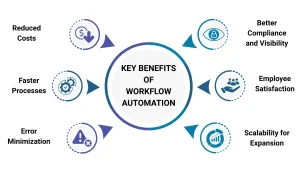
Workflow automation offers revolutionary benefits that optimize processes and enable teams to flourish. It frees up workers to focus on strategic work that creates genuine value by doing away with tedious manual tasks.
Reduced Costs:
Routine processes like data entry and approvals shift from labor-intensive efforts to automated flows, cutting overhead costs without lowering quality.
Faster Processes:
Tasks that used to take days, like routing invoices or assigning leads, now take minutes. This speeds up cash flow and response times.
Error Minimization:
Automated rules reduce mistakes, making sure data is handled accurately and compliance checks are consistent.
Better Compliance and Visibility:
Built-in audit trails and automated notifications help meet regulations and give real-time dashboards for better oversight.
Employee Satisfaction:
Employees spend less time on boring tasks and more time on creative problem-solving and working with customers, which boosts morale and retention.
Scalability for Expansion:
Systems flex with business growth, handling increased volume seamlessly without proportional resource demands.
Workflow Automation Use Cases by Function
Sales and Marketing
- Workflow automation captures leads from forms and ads into the CRM, enriches and scores them, then routes high-intent opportunities to the right rep automatically.
- It also updates deal stages, schedules follow-ups, and runs nurture sequences to keep pipelines tidy without the need for manual chasing.
Customer Support and Service
- Incoming emails, chats, and forms convert into tickets that are categorized and routed based on topic, priority, or SLA rules.
- Status updates, escalations, and satisfaction surveys trigger automatically, improving response times and consistency across the support experience.
Finance and Accounting
- Invoices and expenses move through standardized approval chains, with data extracted and pushed into accounting systems without re-keying.
- Recurring billing, reminders, and dunning workflows run on schedule, tightening cash flow and reducing missed payments.
Human Resources
- Onboarding workflows assign tasks, provision access, send documents, and schedule introductions as soon as a new hire is confirmed.
- Leave requests, policy acknowledgments, and performance review cycles follow predefined approval and notification paths, reducing admin load and compliance risk.
IT and Operations
- Service requests and incidents are auto-categorized, routed to the right resolver group, and tracked end-to-end with clear SLAs.
- Monitoring alerts can trigger remediation steps, open tickets, or notify on-call staff, helping teams maintain uptime without continuous manual control.
Real-World Examples Driving Growth
Real-world deployments illustrate automation’s growth impact. A financial services firm with a high‑volume sales model was losing deals because contracts took hours to generate after calls. By automating contract creation inside the CRM and letting reps generate, send, and get contracts e‑signed while still on the phone, they turned a slow, multi‑team process into a single streamlined workflow. It significantly lifted the sales conversion rate by 45% and eliminated the need for a dedicated contract team. Read the full case study.
Another example involves a real estate team that spent 3–4 hours every day manually copying property data and photos from their CRM into multiple listing platforms and posting 20–30 ads across different sites. By introducing an ad‑posting automation workflow via a Chrome extension that pulls listing details directly from the property database and auto‑fills each platform’s form in one click, the entire process became a single, repeatable action instead of dozens of manual steps. This cut roughly 4 hours of low‑value work per agent per day, reduced listing errors, and made it much easier for the team to hit monthly targets, consequently supporting higher revenue and more time spent on actual selling rather than data entry. Read the full case study.
Conclusion
Workflow automation has shifted from a competitive advantage to a baseline requirement for any business that wants to grow without burning out its people or breaking its systems. From automating contract generation in high‑volume environments to eliminating hours of repetitive work, the pattern is the same. When workflows run themselves, teams can focus on strategy, relationships, and innovation instead of copy‑paste work.
If your organization is still relying on manual processes for key processes, now is the time to step back, map your workflows, and identify where automation can unlock speed, accuracy, and scale.
Ready to turn your workflows into a real growth engine? Contact Nablasol to design, build, and scale workflow automations that fit the way your business actually operates.
FAQs
What is workflow automation in simple terms?
Workflow automation uses software and rules to handle repetitive business tasks automatically, moving data and decisions between systems and people without manual effort. It ensures accuracy and speed for processes like lead routing or approvals.
How does workflow automation actually work?
It starts with a trigger (e.g., new form submission), applies conditional logic (if-then rules), and executes actions (e.g., update CRM, send email). APIs connect tools like CRM and email for seamless, scalable orchestration.
What are the main benefits of workflow automation?
Key gains include lower costs from reduced manual work, faster processes, fewer errors, better compliance via audit trails, happier employees freed for strategic tasks, and scalability for growth without added headcount.